
How to Create a Website Homepage That Actually Converts
The Big Idea

Your website is not a brochure, a portfolio, or a digital business card. It is the dock. The Dock is the place where visitors arrive, tie up, and decide if this a safe harbor for them.
This single page determines whether the rest of your marketing will matter or be wasted.
The StoryBrand website framework was a major step forward for small business owners. It helped thousands clean up messy, self focused copy, put the customer at the center, and speak with simple clarity.
That work matters.
Clear beats clever.
But here is the limitation that shows up after clarity.
Most stories entertain. They do not compel action.
You go to a movie to feel something. You rarely walk out ready to start a new project that night.
Many websites adopt a clear story and people understand the message but still drift away because nothing tells them what to do right now or gives them a reason to do something right now.
The Dock is the next layer. The Dock takes the clarity of a StoryBrand style message and adds what most sites are missing.
It gives the visitor something to anchor to and a guided path to follow.
Homebuyers can search listings without clicking or scrolling.
A homeowner who wants to remodel a kitchen can scan a portfolio and book a consultation.
A small business owner looking for marketing help can grab a useful resource and schedule a short call.
The Dock does not just tell a story. The Dock anchors the visitor so they do not drift away.
The Real Problem With Most Small Business Homepages
Most small business homepages are built like mini brochures. They look fine and often feel modern, but the structure lets traffic leak.

Three failure patterns show up over and over.
First pattern. Oversized hero images take over the screen while the call to action is vague or invisible. Learn more is not a next step. Contact us is not a next step. Both are stalls.
Second pattern. Menus contain eight or ten choices that feel equal. When the navigation treats everything as a priority, the visitor has to stop and think. Cognitive load rises and action falls.
Third pattern. The real offer is hidden below the fold or behind multiple clicks. The one thing that motivated the visit is not easy to find. The result is the same across industries. People leave.
Here is how those patterns play out in real life:

A real estate buyer lands on your site, wants to see homes, and cannot find a search box quickly. They bounce back to a search engine.
A homeowner who is researching architects wants to see completed projects. They want to see style choice, quality of work. But they are forced to read a long About paragraph first, get bored, and bounce.
A coaching prospect is curious but hesitant. They want a low risk way to check fit. All they can see is a blog archive and a contact form. They leave without raising a hand.
This is not a traffic problem. It is a structure problem. You can invest in ads, post content, build backlinks, create constant Reels, film in 4K, and still lose out if The Dock has no cleats.
Boats keep floating by because there is nothing to secure to.
Why The Dock Homepage Works Better
StoryBrand solved the first half of the challenge. It removed confusion and self centered copy. It gave you a narrative that a visitor can understand in seconds. That is the story half. The action half is different.
A story can entertain, educate, even inspire, and still leave a person sitting still.
A business website needs to move people. The Dock is the structure that turns clarity into action.
Think about three simple contrasts.
StoryBrand tells the story. The Dock gives the visitor something solid to tie to.
StoryBrand makes the visitor the hero. The Dock shows a guided path forward.
StoryBrand simplifies the words. Dock simplifies the flow from arrival to action.
StoryBrand tries to give clarity. The Dock provides the cleats.
One engages. The other secures. You need both.
How to Build a Dock Page

Lead with what they came for
Every visitor arrives with one driving question. If you do not answer it at the top of the page, you lose them.
For real estate, that means property search is visible at the top. Not hidden under a Buy menu. Not under a full width image. A search box or a direct link to search is the first thing a buyer sees.
For architecture, that means a gallery of projects is front and center. Not a long bio, not a paragraph about philosophy. The work is the point. Show the work.
For coaching, that means a free assessment or signature resource is the hero. A short scorecard, a readiness quiz, or a helpful guide that tees up the first conversation. Give them something useful and relevant and connect it to a next step.
Add the value check

After the primary intent is visible, the second job is to reduce uncertainty about value. Visitors want a way to estimate the benefit, the cost, or the fit.
For sellers, a simple home value tool gives a fast signal. For architecture clients, a cost to build guide or a budget ranges explainer helps set expectations. For coaching prospects, a quick self assessment that shows where they stand gives clarity. Value anchors curiosity into commitment.
Simplify navigation

Most menus are built by committees and carry the weight of an org chart. The Dock requires restraint. Three or four top level items are enough. If everything is prominent, nothing is obvious. Favor short labels and remove anything that does not help a first time visitor. You can place richer content deeper in the site. The Dock is for first steps.
Show trust markers
People want to know they will not regret tying up. Give them visible proof near the top. A few short reviews with names. A small row of logos from associations or media mentions. A photo credit. An award badge. These signals are not decoration. They function like cleats on the dock. They allow the visitor to secure safely and proceed.
Finish with clear calls to action

The call to action should be specific and contextual. Use See homes, Book a consultation, Start your free assessment. Avoid vague phrases. Avoid multiple competing buttons that pull attention in different directions. End the section with a single obvious next step.
Do This Not That

To make this concrete, here are simple swaps that turn a brochure homepage into a dock.
Use a property search bar above the fold. Do not hide search beneath a hero image slideshow.
Lead with a project gallery grid for an architect. Do not lead with a paragraph about the firm history.
Offer a two minute readiness quiz for coaching. Do not offer a contact form as the only next step.
Place three to four menu items. Do not stack eight or more across the top.
Show three short reviews near the hero. Do not bury all testimonials on a separate page.
Use one primary button per section. Do not scatter multiple different CTAs side by side.
The Cost of Drifting
The Dock is not just a conversion idea. It is a budget idea. Every click you pay for and every organic visitor you attract is an asset. If The Dock cannot hold them, those assets wash back out to sea. Consider three common channels and how they leak when the dock fails.

Paid ads. When the homepage is vague, paid traffic bounces at a high rate. You end up paying for attention that does not turn into conversations. The fix is not a new ad. The fix is a stronger dock.
Search. You can rank for the right terms and still lose if the home page does not help people tie up. After they look at the page they landed, they will most likely try to orientate themselves by clicking to the homepage - Your Dock.
Referrals. Warm referrals carry trust, but even a referred visitor wants to confirm that they are in the right place. If the first page feels like a maze, the borrowed trust erodes. A clean dock preserves momentum that a friend created.
Objections and Reframes
Three objections come up almost every time.
But my business is unique. Every business is unique. Visitor behavior is consistent. People want clarity, proof, and a clear next step. The Dock is a set of principles that adapts to your niche. The specific modules change. The structure does not.

But a simple page will look amateur. Clutter looks amateur. Confidence looks simple. A focused dock reads as professional because it shows you know what matters and you respect the visitor’s time. The depth of your expertise still exists deeper in the site. You are not removing substance. You are sequencing substance.
But I need to share more detail up front. The Dock is not the entire harbor. The dock is where people secure, then move inward. Put detail into service pages, case studies, and long form posts. Use The Dock to earn the right to be read.
Old Way vs New Way
The old way produced homepages that told a clear story and then stopped. Visitors were engaged, even impressed, and then left. The new way pairs story with structure. The message engages, the layout anchors, and the calls to action direct movement.
In practice that means buyers search, sellers check value, homeowners review a portfolio, and coaching prospects start with an assessment. A Dock does not entertain. A Dock connects and moves.

A Simple Dock Layout You Can Hand to a Designer
Header. Logo on the left. Three to four menu items on the right. One high contrast button that mirrors your primary call to action.
Hero section. A clear headline and a single sentence that states the value. The primary module is the thing they came for. Search box for buyers. Gallery for architects. Assessment for coaching. One primary button beneath it.
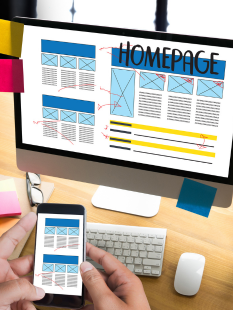
Value check section. A short subhead that promises clarity. Home value. Cost to build. Readiness score. One button that continues the path.
Proof section. Three short testimonials with names or initials. If useful, a small row of logos for associations, media, or partners.
Offer section. A secondary module that supports the main path. For real estate, a seller guide or neighborhood pages. For an architect, a service overview with a simple process. For coaching, a short explanation of the program with the next step repeated.
Footer. Contact info, a tiny menu, and a repeat of the primary call to action. Do not add a second hero down here. Keep it light and useful.
Measuring a Dock That Works

You can tell the dock is working because three metrics improve within a few weeks, even with the same traffic.
First, a lower bounce rate on the homepage. People stay long enough to tie in.
Second, more clicks on the primary call to action modules. Search, value, gallery, or assessment.
Third, more form completions or booked calls. The exact numbers depend on your traffic source and market, but the direction should be obvious. Movement up and to the right means the dock is holding.
Linking Story and Dock Without Picking Sides
You do not need to abandon StoryBrand to adopt a dock. Keep the clear message. Keep the customer as hero. Keep the simple copy. Then add structure that guides movement. A story engages the mind and heart. A dock secures the hands and feet. The work is better together. Message plus map plus mooring.
The Transformation

What changes when you rebuild the homepage as The Dock.
Before. Visitors arrive, skim a clear message, and feel mildly positive. They are not sure where to click, so they put the decision off. They drift to another tab. You lose them, even though they liked you.
After. Visitors arrive, see the one thing they came for, and feel immediate relief. They click. They see a simple value check and a short proof pattern. They click again. They tie in and take the next step. You did not push. You removed friction and showed the way.
Build Your Dock

If your homepage feels like a clear story that still lets people drift, the solution is not more traffic. The solution is a better entry point. Build a dock that helps visitors tie up, step aboard, and become clients. When you give people something to anchor to, your entire marketing system gets lighter and more profitable.
In The Yacht Club, the November clinic is about The Dock and The Voyage Frameworks.
Dock = Homepage
Where people arrive, explore, and decide what to board.
Voyage = Conversion Page
Where they commit, take action, and move forward with you.
If you join The Yacht Club now or work with me 1 to 1, you’ll get access to these clinics and personally help from me, including an AI prompt to help you create and optimize your Homepage and Conversion pages, faster and easier.